The Compet+ suite

One suite to register, organize, and progress in archery.

Compet+ is a family of free tools built around archery competitions: collect registrations, run your tournament 100% compatible with Ianseo, and follow your progress every day as an archer, a coach, or a club leader. Soon, Quiver+ joins as the mobile companion for archers.

100% free 100% compatible with Ianseo Stable release aware Made for archery events
The Compet+ suite

One sphere, four products, every step of the archery season.

Compet+ is not a single tool — it is a suite built around the whole lifecycle of an archery competition, from opening registrations to following an archer's progress after the event.

Diagram of the Compet+ suite: Inscriptions, Organize, Cloud and Quiver+ connected around Compet+ Inscriptions competitions Organize tournament Cloud daily progress Quiver+ (coming soon) Compet+ free suite

Collect registrations

Archers browse and register for competitions online, organizers manage entries in real time.

See the use case →

Organize your tournament

Web module or Windows desktop app, 100% compatible with Ianseo, for a clearer operator workflow.

See the use case →

Follow your progress

Plan trainings, manage coaching groups, track club inventory — all in your personal cloud space.

See the use case →

Play, train, progress — Quiver+

The upcoming mobile companion for archers: games, challenges and progress tracking on the go.

See the use case →
Compet+ is 100% free

Inscriptions, the web module, the desktop app and Cloud are entirely free for archers, coaches, clubs and organizers — no subscription, no per-event fee. Quiver+, the future mobile companion, will offer a free core experience with an optional paid tier.

Use cases

Tell us what you want to do.

Pick the situation that matches you today — the tab below shows exactly which Compet+ product to use and how it works.

Free Web

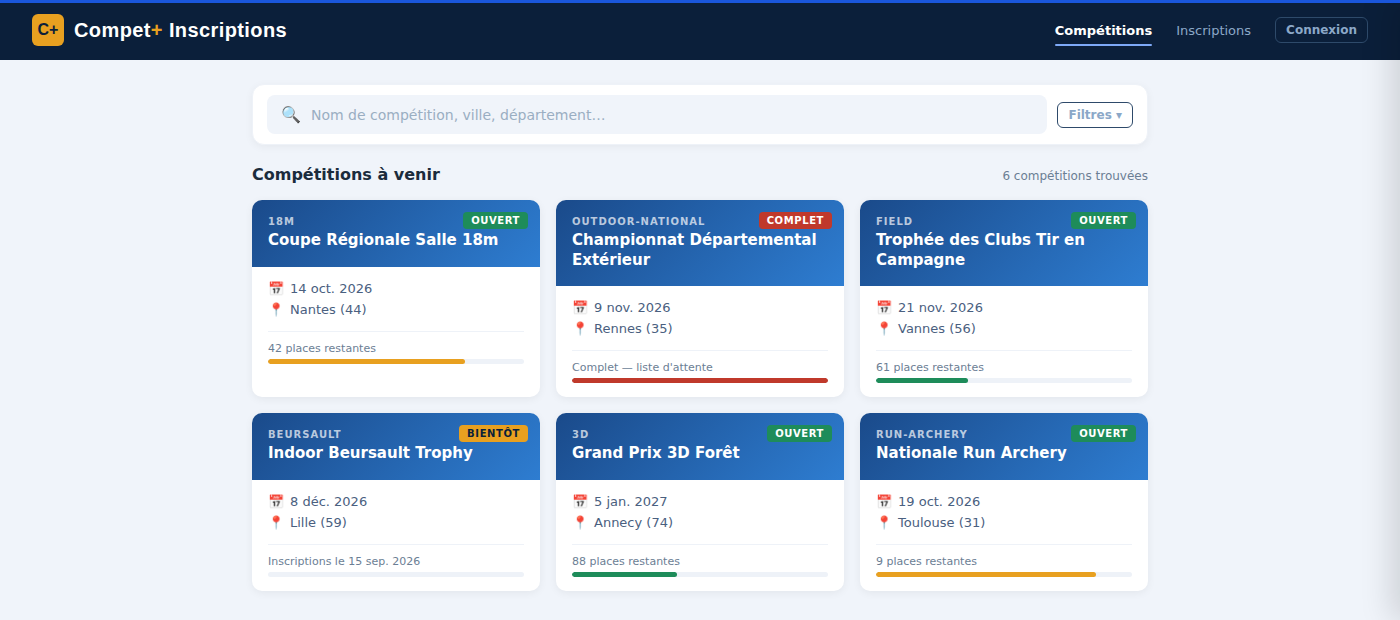
Collect registrations with inscriptions.competplus.fr

A public, mobile-friendly site where archers search competitions, register themselves (or their club members), pay online when needed, and manage their entries — while organizers follow registrations live.

  • Browse and filter upcoming competitions by discipline, region or department.
  • Individual and team registrations, guest checkout, delegated registration for club members.
  • Real-time places remaining, waiting lists, and confirmation emails.
Free 100% Ianseo compatible

Organize your tournament — web module or desktop app

⚙️ Runs alongside an Ianseo installation you already have — it is not a replacement for Ianseo.

Compet+ modernizes the tournament workflow around Ianseo with a cleaner interface and a smoother path from setup to results. Choose the web module for a native fit inside your existing stack, or the Windows desktop app for a dedicated local station.

  • Drop the web module into Modules/Custom of your existing Ianseo environment.
  • Or install the Windows desktop app for a focused, standalone operator station.
  • Same clear workflow either way: configure, register, assign fields, score, publish.
No access to your club's hosting? Pick the Windows desktop app — no server setup needed.
Free cloud.competplus.fr

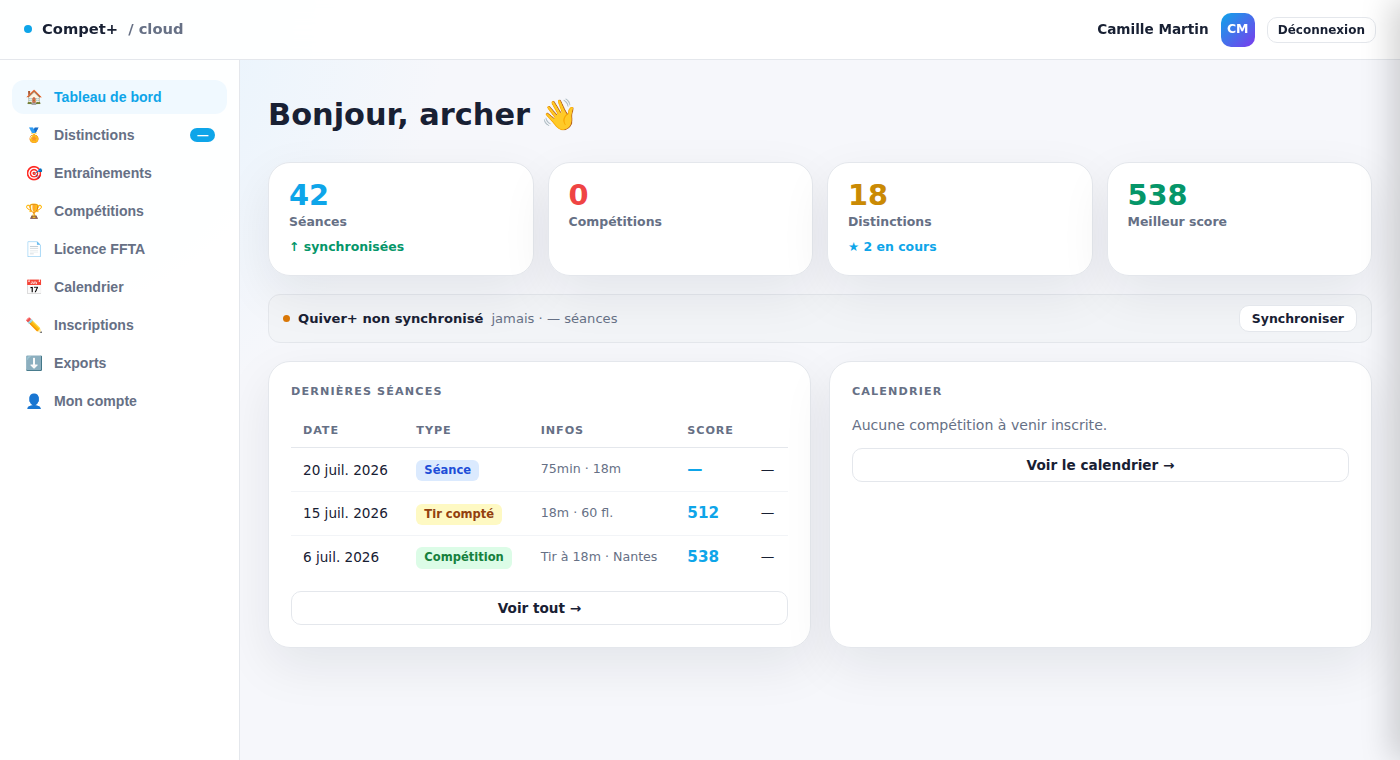
Follow your daily progress with Cloud

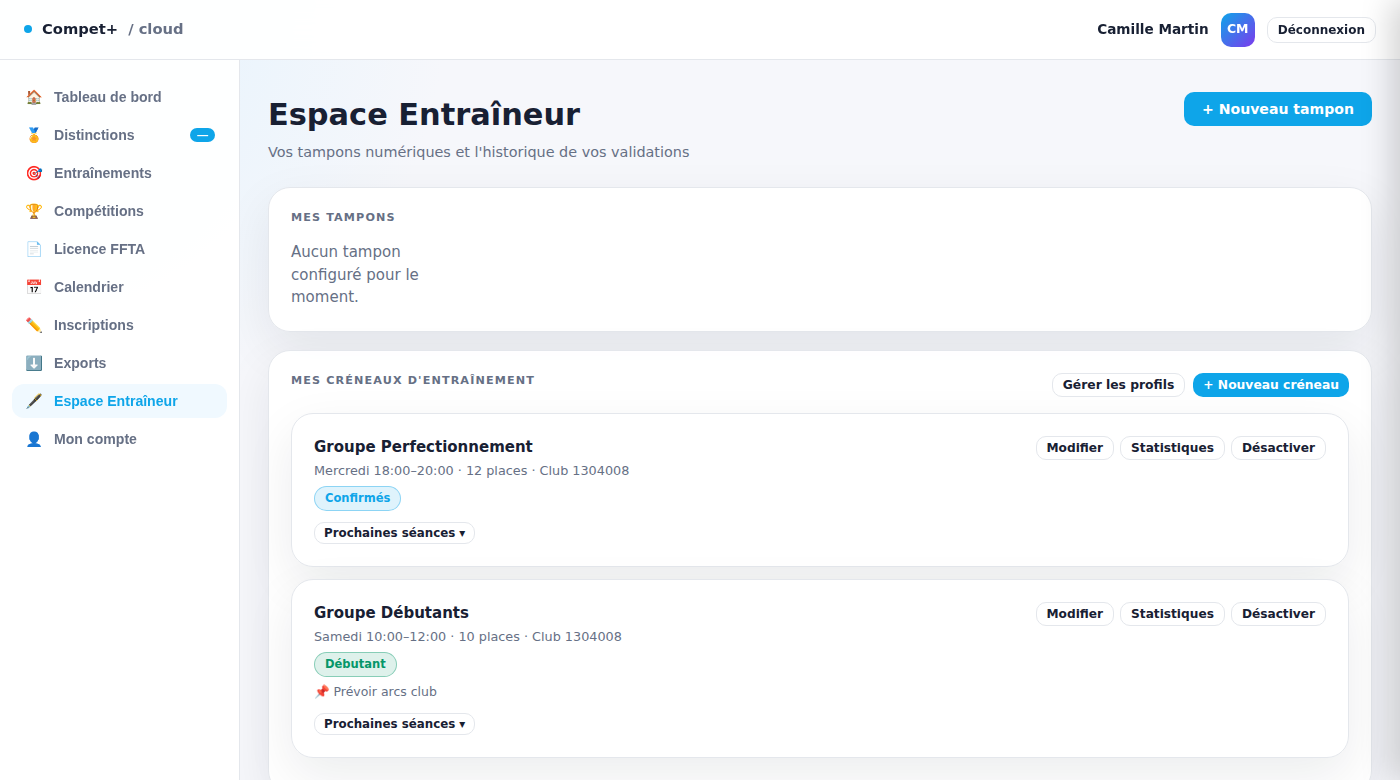
Whatever role you play in your club, Cloud gives you a personal space: an archer follows scores and distinctions, a coach plans trainings and manages groups, a club leader manages equipment inventory — and soon Quiver+ joins as the mobile companion.

  • As an archer: scorecards, distinctions, FFTA licence and competition calendar in one place.
  • As a coach: build training sheets, plan sessions, and manage your training groups.
  • As a club leader: manage shared equipment inventory and loans.
Coming soon

Quiver+, the mobile companion for archers

Quiver+ is the upcoming mobile app that turns daily practice into a game: challenges, streaks and rewards on top of the same progress tracking as Cloud, right in your pocket.

  • Playful games and challenges to make training sessions more motivating.
  • Progress tracking synced with your Compet+ Cloud archer profile.
  • Free to use, with an optional paid tier for advanced features.
Not available yet — follow this page for the launch
Downloads

Choose the version that fits your event.

Download Compet+ for your preferred setup: a web module for an existing Ianseo environment, or a Windows desktop app for a dedicated local workstation.

No access to your club's hosting? Pick the Windows desktop app — no server setup needed.
Web module Checking stable release…

Compet+ Web Module

Drop Compet+ into your Ianseo environment under Modules/Custom and unlock a more modern operator experience directly from the browser.

Web module Ready to deploy Manifest lookup in progress
  • Ideal when you already host your competition environment online or on a local network.
  • Fits the existing Modules/Custom workflow instead of asking you to reinvent your deployment.
  • Great for shared access across multiple operator machines.

This link will automatically bind to the current stable package when the manifest is reachable.

Desktop app Checking stable release…

Compet+ Desktop for Windows

Install Compet+ as a dedicated Windows application when you want a focused local setup and a standalone operator station.

Desktop app Windows Manifest lookup in progress
  • Useful for club laptops, scoring desks, or environments where a dedicated application is more comfortable.
  • Clear installation path for operators who prefer a classic installer workflow.
  • Designed for a simple Windows installation workflow.

This link will automatically bind to the current stable installer when the manifest is reachable.

Web module

How to deploy Compet+ into Modules/Custom

A short deployment path, because no one has ever said “please make setup more theatrical”.

1

Download the web module

Use the web download button above and retrieve the Compet+ package.

2

Extract the archive

Unzip the package locally and make sure the resulting folder is named competplus.

3

Copy it into your Ianseo custom modules path

Place the folder in the expected custom modules location of your installation.

Modules/Custom/competplus/
4

Open the module from your environment

Once the files are in place, access Compet+ from the custom module entry in your web environment and verify that the module loads correctly.

Desktop app

How to install the Windows application

Straight to the point: download, run, install, launch. The revolutionary part is that it stays simple.

1

Download the Windows app

Use the desktop button above and retrieve the Windows application package.

2

Run the installer

Launch the downloaded file and follow the installation steps proposed by Windows.

3

Open Compet+

Start the desktop application from the Start menu or desktop shortcut after installation is complete.

4

Launch and get ready

Open Compet+ and prepare your competition workspace.

Usage guide

Start here, then run the event with confidence.

Whether you use the web module or the desktop app, the operating logic stays familiar: create or import your tournament context, configure it, register archers, prepare field assignment, enter scores, and generate outputs.

A

Open or import your tournament context

Start from an existing event or prepare the working environment you want to manage in Compet+.

B

Configure the event

Review dates, location, sessions, and the tournament structure before registrations begin.

C

Manage registrations and field assignment

Register archers, organize assignments, and prepare the field layout with a cleaner workflow.

D

Capture results and publish outputs

Use the result flow to enter scores, monitor progress, and produce the documents and exports you need.

FAQ

Common questions, before they become support tickets with personality.

Is Compet+ free?

Yes. Inscriptions, the web module, the desktop app and Cloud are entirely free for archers, coaches, clubs and organizers. Only Quiver+, the upcoming mobile companion, will offer an optional paid tier on top of a free core experience.

What's the difference between the Compet+ products?

Inscriptions.competplus.fr collects registrations. The web module and desktop app run the tournament itself, 100% compatible with Ianseo. Cloud.competplus.fr is where archers, coaches and club leaders follow progress day to day. Quiver+ will be the mobile companion.

Do I need Ianseo already installed?

For the web module, yes: it is dropped into an existing Ianseo installation and does not replace it. If you don't manage that installation yourself, ask your club or league's usual Ianseo contact, or start with the Windows desktop app, which needs no server access.

What is Quiver+?

Quiver+ is the upcoming mobile app for archers: playful challenges, streaks and progress tracking synced with your Compet+ Cloud profile. It is not available yet — this page will be updated at launch.

Which version should I choose?

Choose the web module when you want Compet+ inside your existing web environment. Choose the desktop app when you want a dedicated Windows application on a local machine.

Will I get the right package?

Yes. The download buttons are prepared to point to the current public packages, without exposing internal release details to visitors.

Is Compet+ only for experts?

No. Compet+ is designed to make tournament operations clearer for organizers, clubs, and scoring desks.

Can I use both versions?

Yes. Use the web module for shared environments and the desktop app when a local operator station is more comfortable.

How do I get help if something goes wrong?

Write to contact@competplus.fr — for setup questions or an issue during a live event.